YouTube Profile Picture Size Guide: Best Dimensions, Resolution, and Design Tips
Your YouTube profile picture is one of the first things viewers notice when they visit your channel. It plays a major role in establishing credibility, recognition, and professionalism.
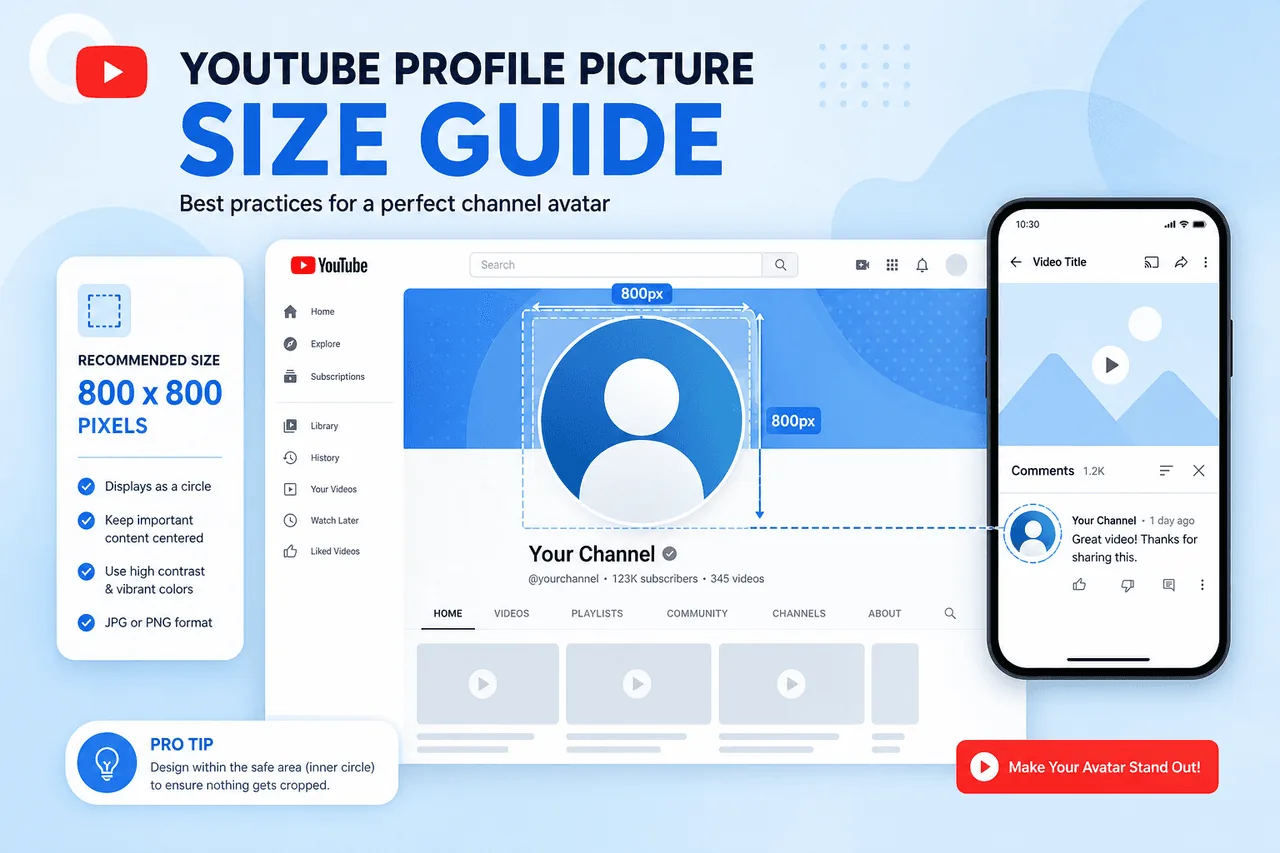
Quick overview
A well-designed profile image helps viewers instantly recognize your channel in search results, comments, subscriptions, and video recommendations. Using the wrong dimensions or a low-quality image can make your channel appear unprofessional.
In this complete guide, you'll learn the recommended profile picture dimensions, file requirements, best design practices, and how profile pictures contribute to successful YouTube branding.
Related tool: Use our YouTube Profile Picture Downloader — Save channel profile pictures and avatars in high resolution.
Why Your YouTube Profile Picture Matters
Your profile picture acts as your channel's visual identity. It appears across YouTube on channel pages, search results, video comments, subscription feeds, community posts, live chats, and video recommendations.
Since viewers often see your profile picture before interacting with your content, it plays an important role in creating a positive first impression. A strong profile picture can increase brand recognition, improve professionalism, build trust, support channel growth, and strengthen visual branding.
Successful YouTube creators understand that profile pictures, thumbnails, and channel banners work together to create a consistent brand identity.
Recommended YouTube Profile Picture Size
The recommended YouTube profile picture size is 800 × 800 pixels. This square image size provides excellent quality while ensuring compatibility across all devices.
Official YouTube Profile Picture Specifications
| Specification | Recommendation |
|---|---|
| Recommended Size | 800 × 800 pixels |
| Aspect Ratio | 1:1 (Square) |
| Minimum Size | 98 × 98 pixels |
| Maximum File Size | 4 MB |
| Supported Formats | JPG, PNG, GIF, BMP |
Although the image is uploaded as a square, YouTube displays profile pictures as circles. This makes proper image placement extremely important.
Understanding the Circular Crop
One of the most common mistakes creators make is forgetting that YouTube crops profile pictures into a circular shape. When designing your profile image:
Keep Important Elements Centered
Logos, faces, and text should remain inside the center safe area.
Avoid Corner Placement
Important details placed near the corners may be cropped out.
Preview Before Uploading
Always check how the image appears in circular format before publishing.
Why 800 × 800 Pixels Is the Best Size
YouTube recommends 800 × 800 pixels because it offers several benefits.
High Image Quality
The resolution provides a sharp appearance on modern displays.
Mobile Compatibility
The image remains clear even on smartphones and tablets.
Future-Proof Design
Higher-resolution images maintain quality as display technology evolves.
Professional Appearance
Sharp images contribute to a more polished and trustworthy channel presentation.
Profile Picture Resolution Explained
Many creators confuse dimensions and resolution.
Dimensions
Dimensions refer to the image's width and height — for example, 800 × 800 pixels.
Resolution
Resolution refers to the level of detail within the image. An image may have correct dimensions but still appear blurry if created from a low-quality source.
For best results, use high-resolution source images, export at 800 × 800 pixels, save as PNG when possible, and avoid excessive compression.
Best Practices for YouTube Profile Pictures
A properly sized image is only part of the equation. Design quality is equally important.
Avoid excessive details, busy backgrounds, and small text.
Dark logo on light background or bright brand colors improve visibility.
Match your channel banner, thumbnails, and social media profiles.
Choose designs that remain identifiable even at very small sizes.
Personal Channels vs Business Channels
Profile picture design depends on your channel type.
Personal Brands
Creators often use professional headshots, personal portraits, or branded photos. Faces help create familiarity and trust.
Business Channels
Companies typically use logos, brand marks, or simplified icons. Business profile pictures should emphasize brand recognition.
Common Profile Picture Mistakes
How Profile Pictures Support Channel Growth
Although profile pictures don't directly affect rankings, they influence viewer perception. A professional profile picture can increase trust, improve brand recall, encourage subscriptions, and enhance overall channel appearance.
When viewers repeatedly see a recognizable image, they become more familiar with your brand.
Complete YouTube Branding Strategy
A successful YouTube channel requires more than just a profile picture. Thumbnails, banners, and avatars work together.
Profile Image Downloader
Save and view profile pictures in high quality for branding research.
Open tool →Thumbnail Downloader
Analyze successful thumbnail designs and learn what works in your niche.
Open tool →Channel Banner Downloader
Study successful banner layouts and branding strategies from top channels.
Open tool →Together, these visual elements create a cohesive and memorable brand experience. Read our guide on how to download YouTube profile pictures for step-by-step instructions.
How to Analyze Successful YouTube Profile Pictures
One of the best ways to improve your profile picture is by studying successful creators. Look for patterns in logo simplicity, color selection, contrast, branding consistency, and visual clarity.
Using a YouTube Profile Image Downloader, creators can examine profile pictures in full size and better understand effective branding techniques.
Frequently Asked Questions
What is the best YouTube profile picture size?
The recommended size is 800 × 800 pixels.
What aspect ratio should I use?
YouTube profile pictures should use a 1:1 square aspect ratio.
Why does YouTube crop profile pictures into circles?
The circular format creates a consistent visual experience across the platform.
Can I use a logo as my profile picture?
Yes. Logos are commonly used by businesses and brands.
Can I download YouTube profile pictures?
Yes. A YouTube Profile Image Downloader allows users to save channel avatars in high quality.
Can I download other YouTube images?
Absolutely. A YouTube Thumbnail Downloader can save video thumbnails, while a YouTube Channel Banner Downloader allows users to download channel artwork.
Ready to Download a Profile Picture?
Extract channel avatars at full resolution from any public YouTube channel — free, no account required.
Try YouTube Profile Image DownloaderConclusion
Choosing the correct YouTube profile picture size is essential for creating a professional and recognizable channel. The recommended dimensions of 800 × 800 pixels ensure your profile image remains sharp, clear, and compatible with YouTube's circular display format.
Beyond technical specifications, successful profile pictures rely on simplicity, strong branding, high contrast, and visual consistency. By studying effective examples through a YouTube Profile Image Downloader, analyzing thumbnails with a YouTube Thumbnail Downloader, and reviewing channel artwork using a YouTube Channel Banner Downloader, creators can develop a complete visual branding strategy that supports long-term channel growth.
A well-designed profile picture may seem like a small detail, but it can have a significant impact on how viewers perceive your channel and remember your brand.


