Best YouTube Channel Logo Size: Complete Guide for Creators
Your YouTube channel logo is one of the most important branding elements on your channel. A professional logo helps viewers recognize your brand instantly and makes your channel look trustworthy and established.

Quick overview
Whether you're a content creator, business owner, influencer, educator, or gaming streamer, your logo helps viewers recognize your brand instantly. Many creators upload logos with incorrect dimensions, low resolution, or poor designs that appear blurry across YouTube.
In this complete guide, you'll learn the best YouTube channel logo size, recommended dimensions, file requirements, design tips, and common mistakes to avoid.
Related tool: Use our YouTube Profile Picture Downloader — Save channel profile pictures and avatars in high resolution.
What Is a YouTube Channel Logo?
A YouTube channel logo is the profile image displayed next to your channel name throughout YouTube. Your logo appears in YouTube search results, channel pages, video comments, subscription feeds, community posts, live chats, and video recommendations.
Because viewers frequently see your logo while browsing YouTube, it plays a major role in building brand recognition. Think of your channel logo as your digital identity.
Why Your YouTube Logo Matters
Many creators focus heavily on thumbnails and video quality while overlooking their channel logo. A strong logo helps build trust, improve brand recognition, increase professionalism, make your channel memorable, strengthen visual branding, and encourage repeat viewers.
Successful YouTube channels often have logos that viewers can recognize instantly, even when displayed at very small sizes.
Best YouTube Channel Logo Size
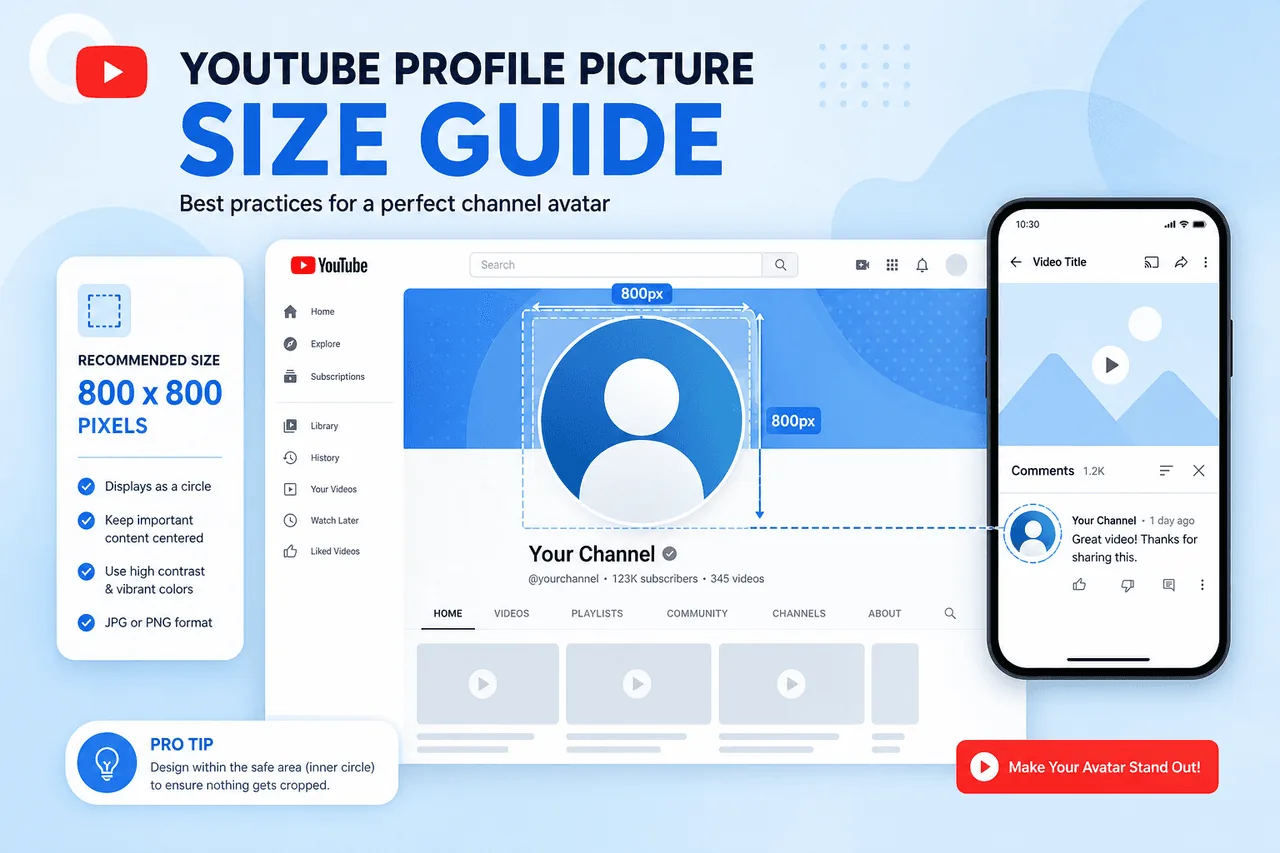
The recommended YouTube channel logo size is 800 × 800 pixels. This is the official size recommended by YouTube for profile images and channel logos.
YouTube Logo Specifications
| Specification | Recommended Size |
|---|---|
| Width | 800 pixels |
| Height | 800 pixels |
| Aspect Ratio | 1:1 |
| Maximum File Size | 4 MB |
| Supported Formats | PNG, JPG, GIF, BMP |
| Display Shape | Circle |
Although the logo is uploaded as a square image, YouTube automatically displays it as a circle.
Understanding YouTube's Circular Crop
One of the biggest mistakes creators make is designing logos without considering YouTube's circular display format. When your logo is uploaded, the image starts as a square, YouTube converts it into a circle, and corners are automatically cropped.
Keep these elements centered: text, brand names, icons, faces, and symbols. Avoid placing important details near the corners.
Why 800 × 800 Pixels Is the Ideal Size
High Resolution
The image remains sharp across desktops, tablets, and smartphones.
Better Mobile Display
Most YouTube users access the platform through smartphones.
Future-Proof Branding
Higher-resolution images remain clear on modern displays.
Professional Appearance
Clear logos improve viewer trust and channel credibility.
Best File Format for YouTube Logos
YouTube supports several image formats. PNG is usually the best choice because it maintains sharp edges, preserves image quality, works well for logos, and supports transparency.
JPG files are smaller but may lose image quality during compression. GIF and BMP are supported but less commonly used. For most creators, PNG offers the best balance of quality and compatibility.
Best Design Practices for YouTube Channel Logos
Having the correct size is only the first step. The design itself plays an equally important role.
Avoid complex illustrations, tiny details, and excessive text.
White on dark, dark on light, or bright brand colors improve visibility.
Your logo should be identifiable within seconds at a glance.
Use the same logo across YouTube, website, social media, and marketing.
Personal Brand vs Business Logo
Personal Brand Channels
Many creators use professional headshots, portrait photos, or stylized avatars to build a personal connection with viewers.
Business Channels
Companies often use brand logos, icons, monograms, or simplified symbols to reinforce brand recognition.
Common YouTube Logo Mistakes
How Your Logo Supports Channel Growth
A logo won't directly improve your rankings, but it influences how viewers perceive your channel. A professional logo can increase trust, improve recognition, encourage subscriptions, strengthen branding, and support audience loyalty.
Over time, viewers begin associating your logo with your content — recognition that can lead to more clicks and repeat viewers.
Build a Complete YouTube Brand
Your channel logo is only one part of your overall branding strategy.
Profile Image Downloader
View and analyze channel logos and profile images in full size.
Open tool →Thumbnail Downloader
Study successful thumbnail designs and understand what works in your niche.
Open tool →Channel Banner Downloader
Analyze banner layouts, typography, and branding from top channels.
Open tool →Together, logos, thumbnails, profile images, and banners create a cohesive visual identity. See our profile picture size guide for related dimensions and crop tips.
How to Analyze Successful YouTube Logos
One of the easiest ways to improve your branding is by studying successful channels. Look for simplicity, high contrast, strong iconography, consistent branding, and easy recognition — even at very small sizes.
A YouTube Profile Image Downloader can help you save and examine channel logos from competitors in your niche.
Frequently Asked Questions
What is the best YouTube channel logo size?
The recommended size is 800 × 800 pixels.
What aspect ratio should I use?
Use a 1:1 square aspect ratio.
Does YouTube crop channel logos?
Yes. YouTube displays logos as circles, so the corners are automatically cropped.
What file format is best?
PNG is generally the best option because it preserves image quality and sharp edges.
Can I use a photo as my YouTube logo?
Yes. Many personal brands use headshots or portrait photos as their channel logo.
Can I download YouTube profile images?
Yes. A YouTube Profile Image Downloader can help you save and analyze channel profile pictures.
Can I download other YouTube branding assets?
Absolutely. A YouTube Thumbnail Downloader can save video thumbnails, while a YouTube Channel Banner Downloader allows you to download channel artwork.
Ready to Analyze Channel Logos?
Download profile images and channel logos from any public YouTube channel — free, no account required.
Try YouTube Profile Image DownloaderConclusion
Choosing the correct YouTube channel logo size is an essential part of building a professional and recognizable brand. The recommended dimensions of 800 × 800 pixels ensure your logo remains clear, sharp, and compatible with YouTube's circular display format.
Beyond size, successful logos focus on simplicity, visibility, consistency, and strong branding. By studying effective profile images through a YouTube Profile Image Downloader, reviewing thumbnails with a YouTube Thumbnail Downloader, and analyzing channel artwork using a YouTube Channel Banner Downloader, creators can develop a complete visual branding strategy.
A great logo may seem like a small detail, but it often becomes one of the most recognizable elements of your YouTube channel and can contribute significantly to long-term growth and audience recognition.